SharePoint 2010 – User Profile Sync Error: ERR_Config_DB

I ran into a problem while starting the User Profile Synchronization service. It wouldn’t start…

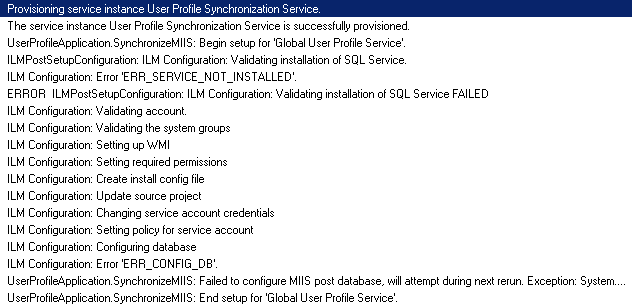
I found that a bit odd, because for several months my SharePoint 2010 deployments are done using PowerShell and every time the User profile Synchronization service started nicely. The first thing I did was opening the ULS viewer and sorted to Category – User Profiles. The ULS viewer than presented me this error:
image

ILM Configuration: Error ‘ERR_CONFIG_DB’

In and effort in solving the problem I read (again) Spence Harbars blogs: Stuck on Starting & Rational Guide to implement SharePoint 2010 User Profile Synchronization. The error I got is mentioned by Spence and is caused due to insufficient privileges of the SharePoint Farm Account on the Profile Sync DB.

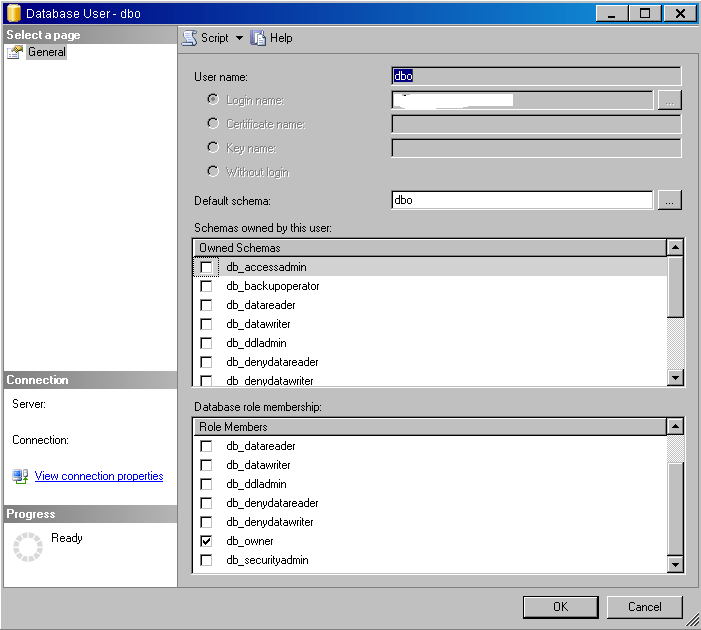
So I went to my SQL Management Studio and looked at the privileges of the SharePoint Farm Account on the Profile Sync DB. I was a bit surprised to see that the SharePoint Farm Account had the correct privileges.
image

So if I had the correct privileges and my PowerShell script had never failed before, why now?

After searching for quite some time I found the solution to my problem!

As a best practice we created a SQL Alias, so nothing new about that. It turns out that MIIS, when configuring the Profile Sync DB, problems has when naming the SQL Alias as the instance name.

So when you got SQL server\Sharepoint and an alias as Sharepoint, the User Profile Synchronization Service would not start. When I used SQL server\instance name, the service started within 200 seconds.

Comments

4 responses to “SharePoint 2010 – User Profile Sync Error: ERR_Config_DB”

  1. SR Avatar
    SR

    Hi,
    I also took the idea of Spencer and crated the UPS application and also my User Profile Synchronization Service started successfully but unfortunately I am unable to create a Synchronization Connection and it shows an error

    “An error has occurred while accessing the SQL Server database or the SharePoint Server Search service. If this is the first time you have seen this message, try again later. If this problem persists, contact your administrator.”

    When I started the User Profile Synchronization Service; I captured the following log

    User Profile Application: Begin synchronizing profile property display names for language lcid = ‘1033’.
    User Profile Application: Done synchronizing profile property display names for language lcid = ‘1033’.
    Provisioning service instance User Profile Synchronization Service.
    The service instance User Profile Synchronization Service is successfully provisioned.
    SetupSynchronizationService :: Sync DB failover Check :: databaseServerMiis = XXXXXXXXXXXXX
    SetupSynchronizationService :: Sync DB failover Check :: originalSyncConnectionString = Data Source=XXXXXXXXXXXXX;Initial Catalog=”XXXXXXXXXXXXX”;Integrated Security=True;Enlist=False;Connect Timeout=15
    SetupSynchronizationService :: Sync DB failover Check:: originalSyncConnectionDataSource = XXXXXXXXXXXXX
    SetupSynchronizationService :: Sync DB failover Check :: new datasource string on connection object = XXXXXXXXXXXXX
    UserProfileApplication.SynchronizeMIIS: Begin setup for ‘XXXXXXXXXXXXX’.
    ILMPostSetupConfiguration: ILM Configuration: Validating installation of SQL Service.
    ILM Configuration: Error ‘ERR_SERVICE_NOT_INSTALLED’.
    ERROR ILMPostSetupConfiguration: ILM Configuration: Validating installation of SQL Service FAILED
    ILM Configuration: Validating account.
    ILM Configuration: Validating the system groups
    ILM Configuration: Setting up WMI
    ILM Configuration: Setting required permissions
    ILM Configuration: Create install config file
    ILM Configuration: Update source project
    ILM Configuration: Changing service account credentials
    ILM Configuration: Setting policy for service account
    ILM Configuration: Configuring database
    ILM Configuration: Re-starting mms service
    ILM Configuration: Checking mms service
    ILM Configuration: Configuring XML file.
    ILM Configuration: Checking for existing FIM database.
    ILM Configuration: Building database.
    User Profile Application: Begin synchronizing profile property display names for language lcid = ‘1033’.
    User Profile Application: Done synchronizing profile property display names for language lcid = ‘1033’.
    ILM Configuration: Configuring certificate.
    ILM Configuration: Configuring Registry keys.
    ILM Configuration: Setting file permissions.
    ILM Configuration: Opening firewall ports.
    ILM Configuration: Starting services.
    ILM Configuration: Post setup configuration.
    Synchronization database was not previously initialized. Exporting the encryption key from the registry key to the database
    ILM Configuration: The ExportMiisEncryptionKey process completed successfully
    UpdateILMMA: Updated ‘ILMMA’ credentials
    UpdateStoreAndCredentialsForInitialManagementAgents: ILMMachine XXXXXXXXXXXXX, Username XXXXXXXXXXXXX
    UpdateStoreAndCredentialsForInitialManagementAgents: Updated ‘MOSS-XXXXXXXXXXXXX’ credentials
    UserProfileApplication.SynchronizeMIIS: End setup for ‘(WoH PROD) User Profile Service Application 2’.
    User Profile Application: Begin synchronizing profile property display names for language lcid = ‘1033’.
    User Profile Application: Done synchronizing profile property display names for language lcid = ‘1033’.

    As you can see in the logs; you can see
    ILM Configuration: Error ‘ERR_SERVICE_NOT_INSTALLED’.
    and related errors.

    Any help would be appreciated.

    1. mklifman Avatar

      The error you see is normal, I do not know why they put it in there. But you will see that you UPS is working perfectly.

      Regards, Mark

  2. […] Via: SharePoint 2010 – User Profile Sync Error: ERR_Config_DB | Something Technical about SharePoint. […]

Leave a Reply