Lync 2010 – Error while installing WebComponents.msi

When configuring certificates for a lync 2010 environment, I noticed that I made a typo. Failing to correct the problem via the topology builder, I had to uninstall the lync software. After correcting my typo, the installation failed to install. This was the error I got:
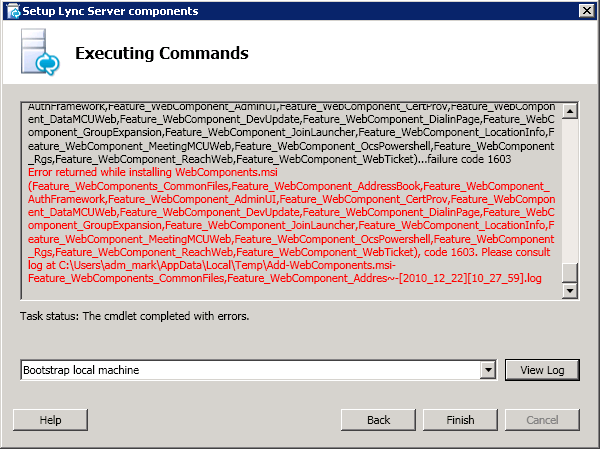
image

After doing some digging I noticed also an event in the eventviewer:image
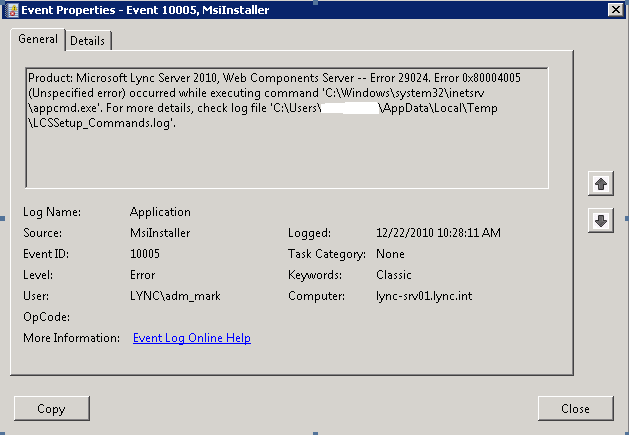
Opening the log file as mentioned in the event, it turned out I had something to do with an duplicate entry in the applicationhost.config.

image

As stated in the error it had something to do with a duplicate entry at line 421. Opening the applicationhost.config learned that line 421 didn’t had anything to do with lync. The trick was to find OCSAuthHelperModule:

bitness64″ />

After deleting this entry, the installation went perfect!

Comments

8 responses to “Lync 2010 – Error while installing WebComponents.msi”

  1. Khaled Salameh Avatar
    Khaled Salameh

    Dude, This was extremely helpful! You Rock!

  2. […] a look at this: http://techsps.wordpress.com/2010/12/22/lync-2010-error-while-installing-webcomponents-msi/ This entry was posted in Uncategorized and tagged Lync. Bookmark the permalink. ← Outlook […]

  3. Steve Avatar

    This post has saved my sanity! as Khaled said, you rock!

  4. jearod Avatar

    You, sir, are a true baller.

  5. colm Avatar
    colm

    worked!!

    saved me a lot of grief, phew!

  6. Vikas Avatar
    Vikas

    Great, Thanks You, issue because of previous installation did with other user,

    also make sure to delete only

    and do not delete

    Thank you for great help

  7. johnye75 Avatar
    johnye75

    This worked Perfect!

  8. Adrian Hayler Avatar

    Excellent! Thanks for that!

Leave a Reply

Discover more from Something Technical

Subscribe now to keep reading and get access to the full archive.

Continue reading